When is my next shift?
Shift calendar for your wall and your phone
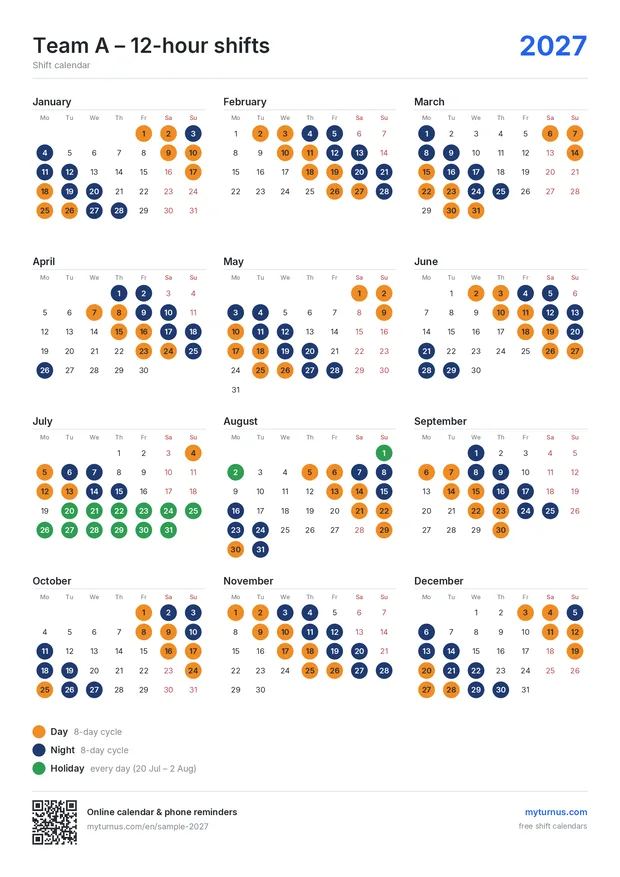
Pick your shift pattern and team – 12-hour, 8-hour, 2-2-3, 24/48 or your own rotation. In two minutes you have a printable year calendar and your shifts in Google or Apple Calendar.
No sign-up needed. You only log in to save it.
Set your rotation
Choose a ready-made pattern or create your own rotation, then pick your team and start date.
Download the PDF
Year overview or two large half-year pages – exactly A4, the same on every printer.
Add it to your phone
Add your shifts to your phone and share the link with your family.
Choose your layout
Shift patterns
- 2 days, 2 nights, 4 off (4 on 4 off)
- Continental: 2 earlies, 2 lates, 2 nights, 4 off
- 2-2-3 (Pitman / Panama, 12 h)
- Weekly rotating earlies, lates and nights (Mon–Fri)
- Earlies and lates, weekly rotation (Mon–Fri)
- DuPont (12 h, 4 teams, 28 days)
- 4 days, 4 nights, 4 off each (16-day cycle)
- 24/48 (24 h on, 48 h off)
- Offshore: 2 weeks on, 4 weeks off
- 12 h: day, night, 2 off
For fire brigades, hospitals and factories
One rota for the whole organisation – on the web, on phones and on the notice board
Publish the rota of every team once – employees and their families add it to their phones and it stays up to date.
- Calendars for all teams (A–E) in one place
- Public page and widget for your intranet
- Your logo and note on every print
- Employees add their team’s shifts to their phone with one tap
Plans
Free
for your own shifts
€0 / year
- All shift patterns, holidays and swaps
- Shifts in Google / Apple Calendar with reminders
- Print-ready PDF in all layouts
- 1 saved calendar
Plus
for you and your family – hours overview and shared days off
€9 / year
≈ €0,75 per month
Everything in Free, plus:
- 5 saved calendars
- Monthly overview of shifts and hours
- Shared days off – compare with your partner or colleague
- No ads
- Own subtitle and note on the print
- No myturnus.com footer on prints
Organisation
for fire brigades, hospitals, factories and security companies
€49 / year
≈ €4,08 per month
Everything in Plus, plus:
- 100 saved calendars
- Rota of all teams on the web and in Google
- Widget for your intranet
- Your logo on the print
Frequently asked questions
Is it free?
Yes. You can create a shift calendar, download it as a PDF and add it to your phone for free and without registering. You only sign in with Google to save it. Paid plans are for families with several calendars and for organisations that publish the rota of all teams.
Which shift patterns are supported?
Ready-made patterns for 12-hour shifts (day–night–off–off, 2-2-3 Pitman, DuPont, 4 on 4 off), continuous 8-hour shifts (early–late–night), weekly rotating shifts, 24/48 duty and offshore rotations. You can also create any custom rotation of up to 84 days.
How do I get my shifts into my phone calendar?
Save the calendar and click “Add to phone”. Your shifts will appear in Google or Apple Calendar with a reminder the evening before. When you change the calendar, your phone updates automatically.
I swapped a shift or I am on holiday. What now?
Click the shift in the preview and then the new day – the shift moves. For a holiday, click “Add holiday” and enter the dates – it replaces the shifts on those days.
Can my family see when I am off?
Yes. Send them the link to the saved calendar – they can add it to their phone too. Organisations can publish a calendar of all teams and embed it on their intranet.
How do I print the calendar on A4?
Download the PDF and choose “Actual size” (100 %) when printing. The PDF is exactly A4, so it prints the same on every printer.